Roller Blind RFQs: Identify the Remote Option
Direct answer: identify the actual remote offer
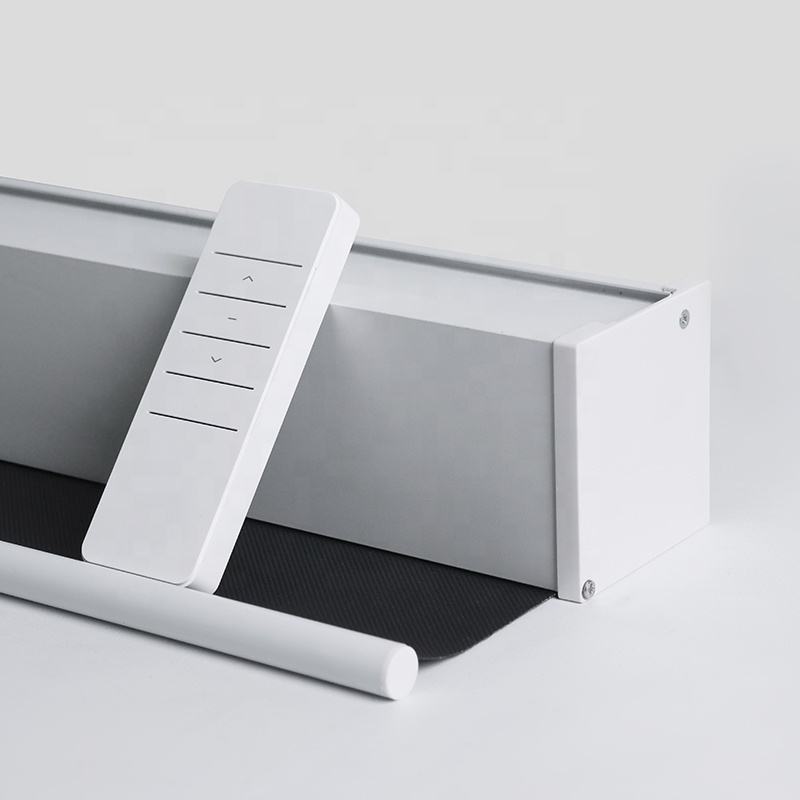
A remote pictured beside a roller blind provides a reference for a supplier question. Obtain written confirmation that an identified remote belongs to the exact blind variant on the quotation. Record whether it is included, separately quoted, excluded or awaiting confirmation before approving that option.
When comparing wholesale roll-up curtains, start with the Indoor Roller Blinds product reference. Its Indoor Roller Blinds and Roll-up Curtain names identify the catalogue reference. Ask the manufacturer to connect your requested remote option to its actual offered configuration; the photograph alone does not establish that connection.
Official Indoor Roller Blinds catalogue reference. Request the actual quoted dimensions, fabric and offered control option from the supplier.
Give the blind and remote separate identifiers
Put the supplier’s blind model or variant reference, quotation line and revision beside the remote reference. If no remote identifier is assigned, request an identifiable manufacturer description or document reference. Clearly distinguish a buyer’s image annotation from a manufacturer model code.
Attach the relevant catalogue image and mark the remote being discussed. Keep that image with the quotation correspondence so both parties can identify the same reference. A reply saying ‘remote as shown’ needs clarification when the picture illustrates several options or is reused for another offer.
Separate inclusion from manufacturer correspondence
Ask whether this remote is part of the commercial offer and which manufacturer record links it to the supplied blind option. An included or separately priced item still needs an unambiguous product correspondence. A separate price alone does not establish that two items are suitable for use together.
For an included option, identify its scope on the quotation. For a separate option, request its own line reference and counting basis. For an excluded option, retain the exclusion beside the blind line. Keep an unanswered question marked unconfirmed rather than filling the gap from the picture.
Where a quotation contains several blind options, ask the supplier to map the remote status to each relevant line. Do not carry one line’s inclusion statement across the entire order. If confirmation arrives in an email attachment, record which quotation revision it supplements and ask the supplier to resolve any conflicting entry.
Official Indoor Roller Blinds catalogue reference. Request the actual quoted dimensions, fabric and offered control option from the supplier.
Buying field
Requested supplier response
Quoted blind option
Supplier model or variant reference, quotation line and revision identifying the actual blind offered.
Pictured remote reference
Image annotation plus the manufacturer remote model, description or document identifier, where assigned.
Commercial supply status
Written included, separately quoted, excluded or unconfirmed status, with its quotation reference.
Manufacturer correspondence
Identified manufacturer record or statement connecting the specific blind option and remote reference.
Sample applicability
Supplier confirmation mapping the proposed sample configuration to those same blind and remote references.
Change or substitution
Updated references and written applicability confirmation if either proposed item or quotation revision changes.
Request a usable written option record
Request the manufacturer’s available model sheet, option list, written correspondence or other identified record supporting the proposed combination. Ask for its identifier, revision if assigned, and the blind and remote references it covers. The supplier should explain its applicability to the particular quoted variant.
A purchasing colleague should be able to follow the answer without guessing. If the supplier proposes an alternative remote or blind configuration, keep its references distinct and request updated correspondence. Record which earlier proposal it replaces so an obsolete attachment cannot remain the approval reference.
Keep catalogue imagery within its actual scope
The whole-blind and closer housing pictures provide visual enquiry references. A remote illustration, arrow marking or control-wave graphic does not establish motorization, communication method, electrical characteristics or supplied accessories. Ask the manufacturer to state the actual operating option offered on the identified quotation line.
The fabric-reference image addresses a different part of the catalogue presentation; it cannot establish remote correspondence. Keep this question focused on the supplied option and manufacturer record. Separate sample decisions should retain their own references, avoiding several unrelated approvals being merged into a vague ‘same as catalogue’ response.
Official Indoor Roller Blinds catalogue reference. Request the actual quoted dimensions, fabric and offered control option from the supplier.
Check the reply against the proposed sample
Read the answer across the quotation, option record and sample description. Blind identity, remote reference and inclusion status should agree. If one document names a different variant or omits the remote, return that specific mismatch for clarification. A general catalogue statement does not settle an unresolved correspondence.
Save the supplier’s dated response with the quotation revision you approve. If either proposed item changes, ask whether the earlier correspondence still applies. The Heqia Textile homepage identifies the supplier catalogue; the actual quotation and manufacturer response define the option under discussion.
If the supplier cannot yet identify the remote or confirm its applicability, ask for a revised offer that clearly shows the outstanding decision. This gives purchasing a specific item to resolve before approval, without treating an image reference as an agreed supplied option.
Keep the offer references together
The actual offered product and supplier variant reference.
The applicable drawing, sample or manufacturer document revision.
The matching quotation line and separately identified options.
Example supplier request
Please quote the Indoor Roller Blinds option identified as [supplier blind reference] on [quotation line and revision]. The attached catalogue image marks the remote under enquiry. Confirm whether it belongs to the offered variant and is included, separately quoted or excluded. Identify the manufacturer remote reference and any available option document supporting its correspondence to this blind. Explain how the proposed sample maps to those references. Identify any substitute separately and update its written correspondence and commercial status. Please leave unresolved fields expressly unconfirmed.
Buyer FAQ
Does the remote picture confirm a motorized blind?
The picture alone does not confirm the operating configuration. Request the actual offered option and a manufacturer statement connecting it to the blind variant and quotation line.
Is a pictured remote automatically included?
Request explicit commercial status for the identified remote: included, separately quoted or excluded. An unanswered inclusion question remains unconfirmed.
What if the supplier has no remote model number?
Request another identifiable manufacturer reference, such as an option description or document identifier. Label your image annotation as a buyer reference and obtain written correspondence to the offered blind.
Can a similar-looking remote be accepted as an alternative?
Treat it as a distinct proposal. Request its manufacturer identity, written correspondence to the quoted blind and revised supply status before accepting it as the purchasing reference.
Which confirmation belongs in the purchase record?
Keep the dated supplier response, applicable quotation revision and identified option document together. They should connect the same blind, remote and proposed sample without unresolved reference changes.
wholesale roll-up curtainsB2B supplier sample record